Thursday, June 21, 2018

Happy Summer!

Happy Summer to my wonderful, hard-working students! Unplug, get outside and enjoy that beautiful sunshine.

One of my favorite sites to start summertime is Start with a Book. Pick a topic of interest--from inventions to dinosaurs to cooking to money--to find recommendations on great books, hands-on activities and projects, writing ideas, related kid-safe websites, mobile apps, a meet-the-author video, and more.

If you do find yourself with some screen time, here are some places to find more to do this summer.
Enjoy!

Friday, April 27, 2018

2nd Grade Visits Museum of Modern Art

Well, sort of. 

All 2nd graders explored the Museum of Modern Art in New York through a virtual tour. Students chose a piece of art to research more in depth, took notes, and typed their reports using Microsoft PowerPoint. Each student made 1 slide. The slides were combined into a class presentation. All artwork and information is from the MoMA website.


Thursday, April 19, 2018

Kindergarten Symmetry Art

 Kindergartners used their mouse control skills to dabble in symmetry art. Students moved the mouse with precision, chose colors and thickness of brush strokes from menus, and practiced clicking and dragging to create their designs.


Kindergartners created and saved their individual pictures using Magic Mirror Paint from ABCya.com. I combined their creations into a single class collage using PhotoCollage.com.

Tuesday, March 20, 2018

The Families of Area A and P7A

First and second graders in Area A and P7A thought about things that make their families special and typed those words using Microsoft Word. They used the "return" key to type on a new line and saved their work. Second graders also learned to copy and paste their work between applications using both the menu and the keyboard shortcuts. They pasted their words into the Word Cloud maker from ABCya.com. Here are some of their Word Clouds.

A1


Monday, March 12, 2018

Area B Book Talks

Second graders in Area B recorded book talks using the iPad app ChatterPix Kid - By Duck Duck Moose. No, really. Their books are talking! Listen to their videos to hear about their current books.

B1


Monday, February 12, 2018

Busy as a Bee-Bot

Students in kindergarten, 1st grade, and 2nd grade have been programming Bee-Bot robots these last few weeks. Students work on sequencing by putting the steps of an algorithm in order to then program the Bee-Bot.


Next students programmed the Bee-Bot to move to a certain location on a double-sided "Challenge Mat."


Here are some of the ways students used the mats.

1) Partners pick a number on the mat, then try to find more than one path to get the Bee-Bot from "start" to the target number. The great thing about this challenge is that there are several right answers. Students have to think about multiple paths around the mat and are not satisfied with only the simplest or most obvious option. Students are asked: Can you program another way to get to the same number? Can you create an algorithm that doesn't go through 0?


2) Students receive cards aligned to grade-level Common Core math standards. As partners they solve the problem or answer the question and then program the Bee-Bot to go to the number on the mat showing the answer. For example, Area A and P7A solved problems of addition and subtraction within 10.


3) Area B took the last challenge a step further. The whole class received the same problem of addition or subtraction within 20, and the teams raced to solve the math problem, plan out the algorithm, and program the Bee-Bot to move to the correct answer. Speed, accuracy, critical thinking, and teamwork all played a role in a team's success.

This was just one type of Challenge Mat. In future units students will program Bee-Bots on a variety of mats to explore other grade-level math and literacy concepts.

Friday, January 26, 2018

"Unplugged" Algorithms

Students learn computer science vocabulary through many ways including body movements, chants, and hands-on (or "unplugged") activities. For example, all students in kindergarten through second grade can tell you with gusto what an algorithm is: a list of steps.

First and second grade students participated in unplugged activities to build the foundation for understanding what an algorithm is. Students sorted visual directions, determined which steps were needed, and put them in order. Area A and P7A determined the correct sequence to plant a seed. Area B sequenced and then followed their algorithm to make a paper airplane. This activity showed students that algorithms can be found in many real life scenarios. It also reinforced that steps need to be in the right sequence to reach an intended outcome.


Friday, December 15, 2017

Kindergarten and 1st Grade Mouse Skills

Kindergartners and 1st graders display another fun way to show off their progress at controlling the mouse. They had to move the mouse with precision across the screen, hold the mouse still while clicking, and click and drag.

Kindergarten


Friday, December 8, 2017

"Wordle" you thankful for, Area B?


Second graders in Area B typed 10 or more words they were thankful for using Microsoft Word. They used the "return" key to type on a new line, saved their work, and learned to copy and paste their work between applications using both the menu and the keyboard shortcuts. They pasted their words into the Word Cloud maker from ABCya.com. Here are some of their Word Clouds.

B1


Saturday, December 2, 2017

Happy Computer Science Education Week!

Try these Hour of Code activities to write your own lines of code and create a nifty project.

Kindergarten-1st Grade


Click Kodable then click "Students Start Here" to begin. Place arrows in the correct order to help the fuzz balls move through the maze.

2nd-3rd grade


Click Puppy Adventure then click "Play Now" to begin. Program the puppy to avoid obstacles and return home by placing commands in order and using loops.

4th-5th Grade


Click Spin Draw then click the button "Play Now" to begin. In this activity you will use code to create a stamping art project.

Friday, November 3, 2017

Kindergarten Shows Off Mouse Skills

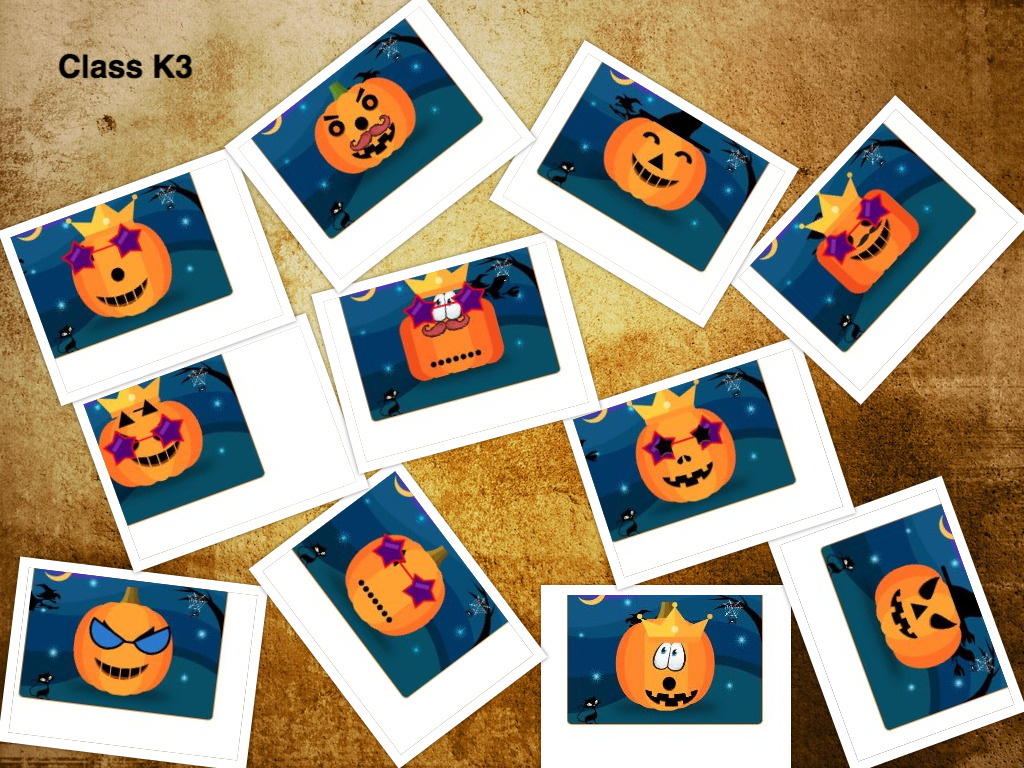
A foundational skill kindergartners work on in tech class is how to use the mouse. Students learn to hold the mouse steady, click, double click, and click and drag items across the screen. Mouse control develops hand-eye coordination and precision.  Creating their own pumpkins is one way students used this skill. 


Kindergartners created and saved their individual pumpkins using the Make a Pumpkin activity from ABCya.com. I combined their creations into a single picture using PhotoCollage.com.

Thursday, November 2, 2017

Kindergarten Class Books: Silly Sally

Did you know we have some super silly kindergartners in our school? I know, what a surprise. Kindergartners show off just how silly they can be in their own versions of Silly Sally by Audrey Wood.

Through this project students took photos of each other using the iPad. Then they recorded their voices on Adobe Spark using silly made-up words that rhyme with their names. Because these books have student pictures and names, the books won't be posted online to protect student privacy. But if you want to see your student's class book, just ask me or their kindergarten teacher to watch it.


Area A and P7A Class Books: Q is for Duck

D is for ice cream? W is for dog? Why?

Area A and P7A wrote their own versions of Q is for Duck: An Alphabet Guessing Game by Mary Elting and Michael Folsom. Read on to find out the answers to these alphabet riddles and more.

A1


Tuesday, October 31, 2017

Area B Class Books: Yes Day!

Are you excited to see what Area B 2nd graders have been working on? If you answered "Yes!" then you are on the right track to enjoy these class books. Area B wrote their own versions of Yes Day! by Amy Krouse Rosenthal. Read on to find out what these 2nd graders are hoping you'll say "Yes!" to.

B1


B2


B3

Monday, September 4, 2017

Welcome back!

Welcome back for an awesome year in technology class!

Creativity, problem solving, storytelling and innovation have been on my mind as I prepared for this year. Students will strengthen mouse skills, typing, and familiarity with navigating computers through project-based learning. Last year every student learned to code. This year students will build off of those gains to learn more coding principles and create projects using code.

Check back throughout the year to see what these techie students are accomplishing!

Tuesday, June 20, 2017

Area D 2nd and 3rd Grade Coding Projects: Flappy Bird Games

This year Area D second and third graders worked on Course 2 of the Code.org curriculum. Students completed the final project of programming an original version of the Flappy Bird game. Click the links below to play the games they created.


D1


By AL       https://studio.code.org/c/402674929

By AM      https://studio.code.org/c/402675148

By AM      https://studio.code.org/c/402675282

By AD       https://studio.code.org/c/402675403

Monday, June 19, 2017

Area A and P7A 1st and 2nd Grade Coding Projects: Play Lab Stories

This year students in Area A and P7A worked on Course 1 of the Code.org curriculum. Many of them completed the final project of programming an original story in Code.org's Play Lab. Click the links below to check out their creations.


A1


By AH      https://studio.code.org/c/402682222

By AZ       https://studio.code.org/c/402682122

By CL       https://studio.code.org/c/402682613

By DS       https://studio.code.org/c/402682310

By JC        https://studio.code.org/c/402682475

By JS        https://studio.code.org/c/402682385

By MA     https://studio.code.org/c/402682518

Thursday, June 1, 2017

Now we know our ABCs: Kindergarten Alphabet Books

Kindergarten students made drawings for an alphabet book using the app Draw and Tell by Duck Duck Moose. Student drawings were combined using Microsoft PowerPoint. Enjoy!

K1


Thursday, May 4, 2017

May the Fourth Be with You

I couldn't resist putting in a little plug for all you Star Wars fans out there. Feeling festive? Try this Star Wars Hour of Code: https://code.org/starwars.

Thursday, April 20, 2017

Plant Growth Time Lapses by Area D

Second and third graders in Area D studied plants earlier this year in science. Students made time lapse videos to show plant growth starting from a seed. They used the ABCya Make an Animation tool. See if you can find the parts of a plant in their animations.

D1